Why Small Business Cybersecurity Requires More Than Antivirus


For many small business owners, cybersecurity starts with a familiar question: "Do we have antivirus installed on all our computers?"
It is a reasonable place to begin.
Antivirus software has been an important part of computer protection for decades. It helps identify malicious programs, block suspicious activity, and reduce the likelihood that an infected file will cause damage.
But the way businesses use technology has changed.
Employees access company information from different locations. Important documents are stored in cloud applications. Email accounts connect to financial information, customer communications, and everyday business decisions. Outside vendors may need access to systems that employees depend on.
A business can have antivirus installed on every computer and still face serious security risks.
That does not mean antivirus has stopped being useful. It means the business environment has become more complicated than any single protective tool can address.
The more useful question is no longer simply whether every computer has antivirus.
It is whether the business has considered the different ways its information, systems, and operations could be affected.
Antivirus Protects an Important Part of the Business
Antivirus software is designed to identify and respond to certain types of malicious software and suspicious behavior.
Modern endpoint protection can do considerably more than scan files for known viruses. Depending on the product and configuration, it may detect unusual processes, block harmful applications, or provide information that helps investigate suspicious activity.
These capabilities remain valuable.
A malicious attachment, infected download, or harmful application can interrupt an employee's work and potentially affect other systems.
However, not every cybersecurity problem involves malicious software running on a computer.
Consider an employee whose email account is accessed by someone who has obtained the correct password.
The attacker may be able to sign in through the same application the employee uses every day.
There may be no infected file to detect.
Or consider a former employee whose access to an important cloud application was never removed. The application itself may be functioning normally, and every company computer may have working antivirus protection.
The problem is not necessarily the computer.
It is the access that remains available.
These examples illustrate why cybersecurity needs to extend beyond individual devices.
Some Security Problems Begin With Legitimate Access
Business owners often think of cyberattacks as attempts to break into a computer or network.
Sometimes the problem is that someone gains access through an account the business already trusts.
Employee email accounts, financial applications, document storage, remote access systems, and administrative accounts can all become important entry points.
If a password is stolen, reused, or disclosed, someone may attempt to access business information without installing malicious software.
This is why identity and access management matter.
Businesses should be able to answer several practical questions:
- Who currently has access to important business applications?
- Are employees given only the permissions their responsibilities require?
- Is multifactor authentication enabled where appropriate?
- Are accounts reviewed when employees change positions or leave?
- Can the business identify and remove access that is no longer necessary?
Multifactor authentication adds another verification requirement beyond a password. It can make certain account compromises more difficult, although it does not eliminate every form of account-based attack.
Access permissions are equally important.
An employee who only needs to review invoices may not need permission to change financial settings. A contractor who needs temporary access to a system may not need that access indefinitely.
These decisions are not simply technical settings.
They reflect how the business operates, who is responsible for information, and how much access each person genuinely needs.
For a closer look at managing employee, contractor, and vendor permissions, read our article Who Really Has Access to Your Business Information?

Employees Influence Security Every Day
Technology can block many threats, but employees still make decisions that affect business security.
Someone receives an unexpected attachment.
A manager gets an email requesting an urgent change to payment instructions.
An employee shares a document with an outside contact.
A staff member receives a multifactor authentication request they did not initiate.
None of these situations necessarily begins with a virus.
They involve decisions made during ordinary work.
The difficulty is that employees are often trying to complete legitimate tasks under time pressure.
An urgent payment request may arrive when accounting is preparing a deadline. A suspicious message may resemble a normal customer inquiry. A request to share information may appear to come from someone the employee recognizes.
Simply telling employees to be careful is not enough.
Businesses need procedures that make the safer decision practical.
For example, a request to change banking information can be verified through an established contact method rather than relying on the instructions in the message itself.
Employees should know how to report suspicious activity without worrying that asking a question will create unnecessary trouble.
Security awareness becomes more useful when it reflects the situations employees actually encounter.
The objective is not to turn every employee into a cybersecurity specialist.
It is to give people enough guidance and support to recognize when something deserves a second look.
Everyday decisions can have a significant impact on business protection. Explore this further in How Everyday Employee Habits Affect Business Security.
Protecting Computers Is Not the Same as Protecting Business Information
A growing amount of business information exists outside individual computers.
Customer records may be stored in a cloud-based application. Financial documents may be accessible through an online accounting platform. Employees may collaborate through shared folders, email, and business communication tools.
These services provide flexibility, but they also create responsibilities.
Who can share information externally?
What happens when an employee accidentally deletes an important document?
Can someone access sensitive information from an unmanaged personal device?
Does the business know which applications contain its most important information?
Antivirus alone cannot answer these questions.
Businesses need to understand where important information is stored, how it is accessed, and what controls are available to protect it.
That includes reviewing sharing permissions, account security, application settings, and backup or recovery arrangements.
It also means recognizing that cloud services and local systems may depend on one another.
An employee might use a cloud application, but still depend on the office network, an authentication service, or another connected system to complete their work.
Security planning becomes more meaningful when these relationships are understood.
Otherwise, a business may protect individual computers while overlooking the systems and information that employees actually depend on.
Cybersecurity Works Better When Protections Support One Another
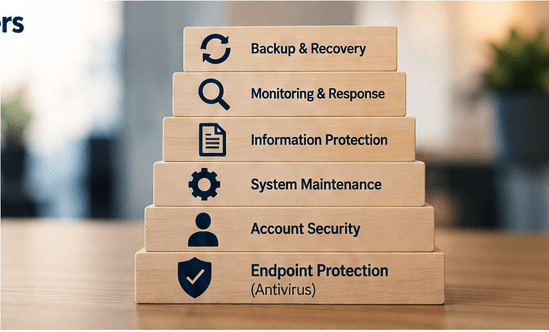
A more complete cybersecurity approach uses multiple safeguards.
This is often called layered security.
The principle is straightforward: if one protective measure fails or does not apply to a particular situation, other safeguards may help prevent, detect, limit, or recover from the problem.
For a small business, those layers may include:
Endpoint protection. Protect computers and other supported devices against malicious software and suspicious activity.
Account security. Use strong authentication, appropriate permissions, and regular access reviews.
System maintenance. Keep operating systems, applications, and network equipment updated to address known weaknesses.
Information protection. Understand where important data resides and control how it is accessed and shared.
Monitoring and response. Establish ways to identify suspicious activity and determine who should investigate it.
Backup and recovery. Maintain appropriate backups and verify that important information and systems can be restored when necessary.
These measures address different problems.
A backup does not prevent someone from accessing an account. Multifactor authentication does not replace system updates. Antivirus cannot determine whether an employee should have access to confidential financial records.
Each safeguard has a purpose.
The goal is not to accumulate as many security products as possible.
It is to understand which risks matter to the business and select protections that work together.
A complicated collection of poorly configured tools may provide less practical protection than a smaller, well-managed set of safeguards with clear responsibilities.
Having multiple security tools is only part of the solution. Learn why coordination matters in What Happens When Business Security Tools Don't Work Together.
Small Businesses Have to Balance Protection With Everyday Operations
Security decisions rarely happen without constraints.
Small businesses have budgets, deadlines, employees to support, and customers expecting work to continue.
Adding protective measures can also introduce inconvenience.
Multifactor authentication may require employees to change familiar sign-in habits. Restricting access may mean someone needs approval before using an application. Installing updates may require coordination to avoid interrupting important work.
These concerns are legitimate.
Security that repeatedly prevents employees from completing necessary tasks can encourage workarounds.
That creates another problem.
A better approach considers both protection and usability.
For example, instead of giving every employee broad administrative access because it is convenient, a business can establish a practical process for requesting elevated permissions when needed.
Instead of allowing unrestricted document sharing, it can define how employees should collaborate with customers and outside partners.
Instead of postponing updates indefinitely, it can schedule maintenance around operational requirements.
The question becomes how to reduce meaningful risks without unnecessarily complicating the work people need to do.
That balance requires an understanding of the business, not just its technology.
How Can a Small Business Decide What to Protect First?
Not every business faces the same risks.
A professional services firm handling confidential client documents may have different priorities from a retailer that depends on point-of-sale systems or a manufacturer whose operations rely on connected equipment.
The starting point should be the activities the business cannot afford to lose or significantly disrupt.
Consider a few practical questions.
Which systems are essential to daily operations?
Identify the applications, equipment, accounts, and connections employees depend on.
If one becomes unavailable, what work stops?
Where is the most important business information?
Determine where financial records, customer information, operational documents, and other sensitive materials are stored.
Who can access them, and how are they protected?
What would happen if an important account were compromised?
Consider email, financial systems, administrator accounts, and cloud applications.
Could someone make unauthorized changes, access confidential information, or interfere with operations?
Who is responsible when something suspicious happens?
Employees should know where to report concerns.
The business should know who can investigate, restrict access, contact relevant providers, and coordinate recovery.
Have existing protections actually been checked?
A security tool being purchased or installed does not automatically mean it is configured correctly, actively monitored, or covering every intended system.
Periodic reviews can reveal missing devices, outdated settings, unnecessary permissions, or responsibilities that nobody clearly owns.
These questions help establish priorities without requiring the business to address every possible cybersecurity concern at once.
Progress Should Be Measured by What the Business Can Actually Do
It is easy to measure cybersecurity by counting products.
A business may have antivirus, a firewall, backups, multifactor authentication, and several other tools.
But the number of tools does not explain how effectively the business is protected.
More meaningful indicators come from practical questions.
Can the business quickly disable access when an employee leaves?
Does someone know when an important protective system stops reporting?
Can employees recognize and report suspicious requests?
Are important updates being applied?
Has the business tested whether critical information can be recovered?
Can the people responsible for technology explain what would happen if an important account or system were compromised?
These questions focus on capabilities rather than purchases.
They also reveal where responsibilities may be unclear.
For many small businesses, improving cybersecurity begins with understanding what is already in place, identifying what is missing, and making existing protections more dependable.
That can be more valuable than immediately purchasing another product.
A More Useful Question Than Whether Antivirus Is Installed
Antivirus remains an important part of business cybersecurity.
But businesses no longer operate entirely within the computers sitting on their desks.
Their information moves through cloud applications, employee accounts, connected systems, outside relationships, and everyday business processes.
Protecting that environment requires more than detecting malicious software.
It requires understanding who has access, where important information resides, how employees work, which systems operations depend on, and what the business can do when something goes wrong.
No single tool can eliminate every risk.
The objective is to build reasonable, coordinated protections that reflect how the business actually operates.
For a business owner, the next useful conversation may not be about buying another security product.
It may be about asking a simpler question:
If something important went wrong tomorrow, which protections would actually help us recognize the problem, limit the damage, and keep the business moving?
That question can reveal considerably more about the state of a business's cybersecurity than knowing whether antivirus is installed.